PicSelec
Photo selection purpose

Let the photos you choose together become your story.

Choose separately, then discuss only the photos where you differ.

Photos to choose togetherSelection list & retouch requests
Up to 4,000 photos · 4 people · stored for 7 days

Wedding guide (Korean)
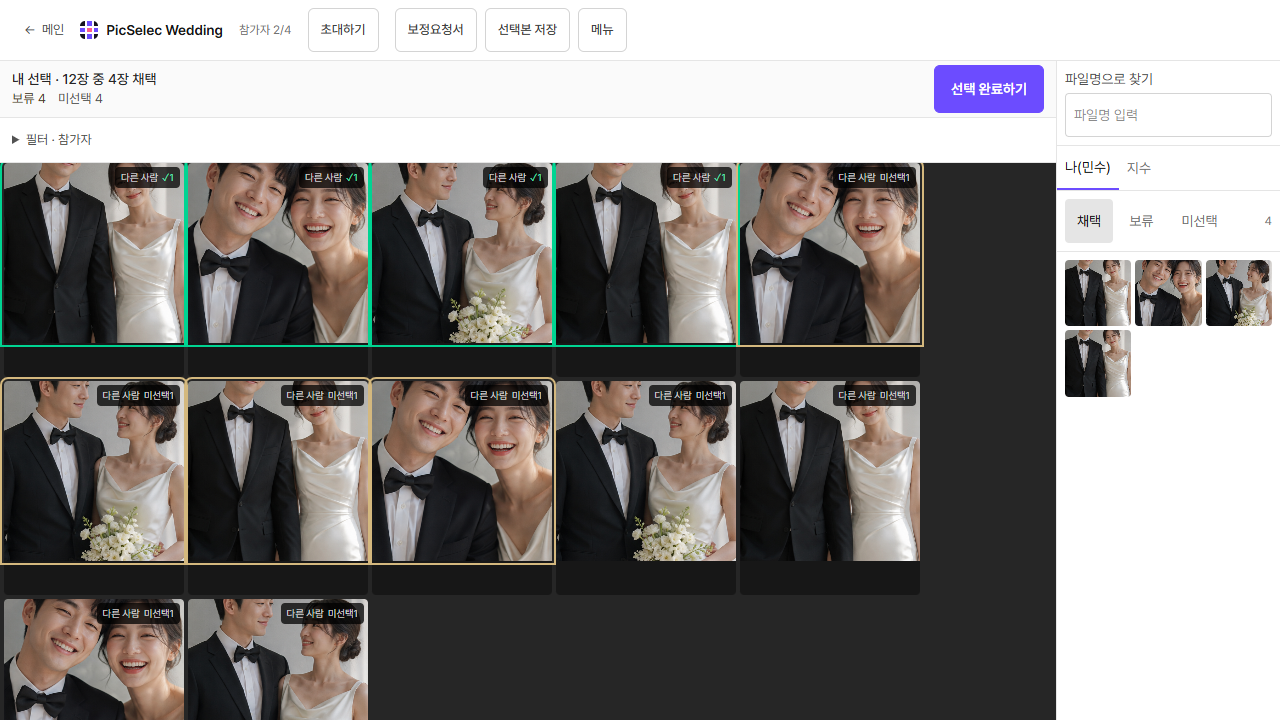
Current Korean wedding selection screen with an AI example photo and both people's Pick, Hold and Cut choices
Current selection screen · AI photos
  1. Prepare photos
  2. Choose photos
  3. Review results

Community

More

The real collaborative selection screen

The current selection screen with AI example photos. Inspect each photo, make your choices and add retouching notes together.

Current Korean wedding selection screen with an AI example photo and both people's Pick, Hold and Cut choices

When you chose different photos

  1. Choose separately first.

    Mark photos as Pick, Hold, or Cut. Your choices appear to each other in real time.

  2. Gather only divided opinions.

    Reviewing only the photos you judged differently means you do not have to restart the entire selection.

  3. Finish with a retouch request.

    After choosing, export a retouch request that you can share with your photographer.

Choosing the first Our Photo image

  1. Pick one photo where both faces are clear.

    A photo with a friend or partner works. Start with a photo where neither face is covered.

  2. Choose the two people to analyze.

    Select yourself and the other person in the photo. You can remove an incorrectly detected face.

  3. Keep your combination as a card.

    See Five Elements chemistry, shared visual style, and colors in the photo, then share the result card. You can select up to three photos.